

One of the things System 7 Today's co-admin Bolkonskij likes to do when sitting down on my Power Mac 8600 / 200 is
a) enjoying one of those cold brew coffee drinks
b) listening to the local radio station via the web
The latter is easy to do, but you keep reading about people having trouble with it. System 7 Today recommends SoundJam MP for your mp3 playback pleasures. And your Mac needs some "oomph". Think of a 603 PowerPC Macintosh as a solid base. The faster your Mac, the better.
So how do I tune-in?
You need to find the stream of your favorite radio station, usually coming as a .m3u file. One favorite source for that is Surfmusic.de. The page works fine with iCab and Netscape 4 and doesn't torture you with JavaScript overkill, but it hides behind encryption. If you've got means to open it anyway, pick your favorite radio station. Life is one hard choice after another, eh?
Then click on the "Stand Alone Player" link, as shown in the screenshot here. It'll download the .m3u file to your PowerPC Macintosh:
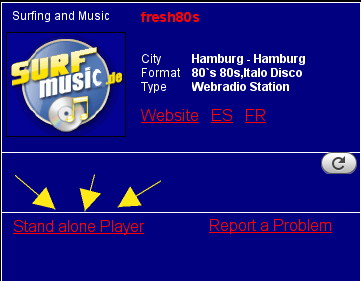
Now add the file to Soundjam MP and radio playback should start soon. Happy listening to your favorite radio on your System 7 Macintosh!
Alternative: rb2rs.freemyip.com
Another more System 7 compatible option that opens fine with iCab 2.9.9 is rb2rs.freemyip.com. Download the latest file to your Mac, e.g. stations-2024-06-24.rsd. It contains data for about 40.000 radio stations, so don't try to open this in Excel.
Instead, open it in BBedit, or another editor of your choice. Things will look ugly, but you should be able to use search (Option + F) to find what you are looking for. Happy listening to your favorite web radio!


Copyright 2026 System7Today.com
.
The Apple Logo, Macintosh, Mac OS, and others property of Apple Computer, Inc.
This site is in no way affiliated with Apple Computer, Inc. |