

| So you want to connect your System 7 machine to a OS X file server? |
It is perfectly possible for a System 7 Mac to connect to your current OS X machine and share files. This tutorial will show you how.
First, be sure to download and install the Open Transport 1.3 and AppleShare 3.8.3 updates. You can find these at the Important Updates page. You will also need MacNFS, which can be found here. I also strongly suggest you install the System 7.6.1 update if you haven't already, as well.
Restart after everything above is installed. |
| Step 1 - Create a NFS share in OS X |
OSX already has NFS implemented, since it's a UNIX based operating system (and NFS is the default file sharing protocol in any UNIX based OS).
What we will use to create our NFS share on OS X is NFS Manager. What it does is give you a nice and "Macish" GUI for the command line NFS stuff. What you need to do now is add a NFS share and set some access rights.
This is pretty straight forward. Remember that you set access privileges based on folder permissions in the OS.
I recommend creating a folder named say "Classic" and setting the permissions on that folder to read & write for everyone. Then share this folder using NFS Manager.
|
| Step 2 |
Back on your System 7 machine, select Apple Menu -> Chooser. Click on MacNFS. If you see your OS X computer listed under "Select a NFS Server:" click on it and click OK. If not, click on "Mount Manually", enter the IP address of the machine you want to connect to, and click OK.

|
| Step 3 |
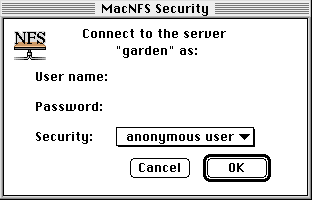
You will be presented with an authentication choice dialog. Enter your username and password, or if you have enabled anonymous access to the folder you have shared choose "anonymous user".
|
| Step 4 |
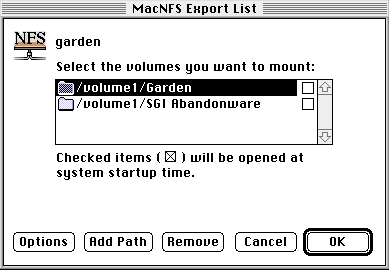
In the next dialog, choose which share you want to mount and get access to, and click OK.
|
| Conclusion |
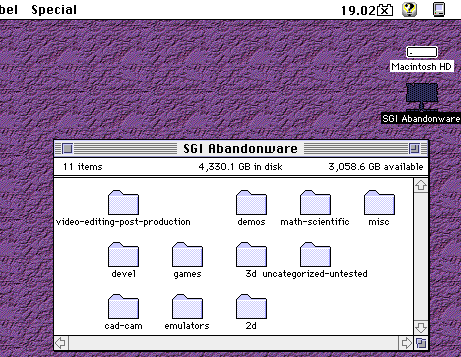
The share you have chosen in the previous dialog will now appear on the desktop, just like any other mounted CD-Rom, harddrive or share. You can now double click it to access your files!
|


Copyright 2026 System7Today.com
.
The Apple Logo, Macintosh, Mac OS, and others property of Apple Computer, Inc.
This site is in no way affiliated with Apple Computer, Inc. |