

Problem:
After downloading and unpacking a program the folder's contents have no icons and cannot be opened or mounted.
Solution:
First, make sure your download download completed.
If it did, it might be a problem with the way the file was compressed. Careless packaging of e.g. Mac OS software as a .zip file created by OSX may lead to such a problem.
Mac OS saves file data in two places - a data fork and a resource fork. Keeping both separated was actually a clever decision in 1984. But it didn't assume we'd be sending and downloading files over the net as we do today.
So what happens is that the resource fork gets lost (containing the creator / type) if not properly compressed with e.g. StuffIt before sending / uploading. Here`s an example from the download of the text-adventure game Silk Dust suffering from this problem:
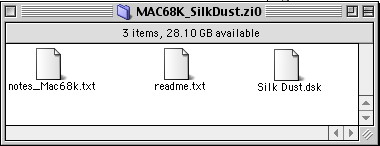
Notice how only a generic icon shows up? Disk Copy, which should mount the .dsk file, would report not recognizing the file if you try to open it from within the program.
How to fix creator codes on Mac OS
Good news is - you're usually able to bring it back. While you could use ResEdit to do the job, there's a plethora of specialized free type / creator code utilities out there in the wild. System 7 Today recommends using File Typer but really any of them should do the job.
- Open up the respective file in your utility of choice.
- You'll be prompted with two input fields for the correct creator / type code.
- Below you'll find a table with the most common codes - enter the right ones manually and save.
How does it look after we assigned the codes back? In this case we set the codes for the text files to SimpleText and the image to Disk Copy's. It now mounts fine, by the way.
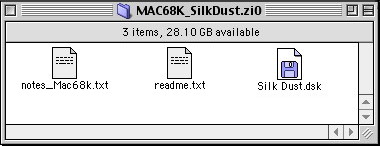
Here's a table with the most common creator / type pairs for an easy fix:
| Program |
File suffix |
Creator code |
Creator type |
| Adobe Acrobat | .pdf | CARO | PDF |
| Disk Copy | .dsk | ddsk | dimg |
| SimpleText | .txt | ttxt | TEXT |
| MS Word | .doc | MSWD | WDBN |
| StuffIt 5.x | .sit | SIT! | SIT5 |
| Toast | .sit | CDr3 | GImg |


Copyright 2026 System7Today.com
.
The Apple Logo, Macintosh, Mac OS, and others property of Apple Computer, Inc.
This site is in no way affiliated with Apple Computer, Inc. |