

Make this page a bookmark! Whether you're looking for a key combo to rebuild your desktop or zapping the PRAM, all the important keyboard commands for System 7 in one place!
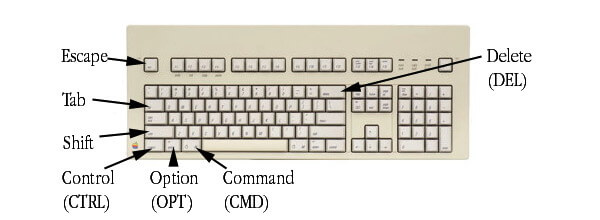
Before booting the Mac
| Key combo | Functionality |
| Hold mouse button |
Ejects floppy disk, if one is inserted |
| Hold down C |
Boots from CD if using an original Apple-CD drive |
| CMD+OPT+Shift+DEL+'#' |
Forces booting from a specific SCSI-device. (replace '#' with device ID) |
| CMD+OPT+P+R |
Zaps PRAM. Settings for screen, clock, mouse etc. are set to default |
While booting the Mac
| Key combo | Functionality |
| Hold SHIFT |
Extensions will be disabled, only the basic OS boots |
| Hold CTRL |
Opens the Debugger if MacsBugs is installed |
| Hold OPT + CMD |
The Finder will rebuild the desktop |
During operation
| Key combo | Functionality |
| ESC+CMD+OPT |
Force quit the application |
| CMD+SHIFT+1 |
Eject floppy from internal drive |
| CTRL+CMD+Power button |
Hard reset. Works only on models without a reset button |
| CMD+Power button |
Starts the Debugger (if MacsBugs has been installed) |
| CMD+SHIFT+3 |
Takes a screenshot and saves it on your hdd |
| CMD+OPT+W |
Closes all opened windows in the finder |
| CMD+UP |
Opens the folder which contains the folder you're currently in |
| CMD+CTR+Triangle key |
Forces an instant restart of the Mac (save your work!) |
Looking for something you couldn't find here? Why not ask the good folks in our forums? 


Copyright 2026 System7Today.com
.
The Apple Logo, Macintosh, Mac OS, and others property of Apple Computer, Inc.
This site is in no way affiliated with Apple Computer, Inc. |